Talli Baby
- 4.2
- Rating
- 10.00K
- Installs
- Free
- Price

 Analysis by App-foxy
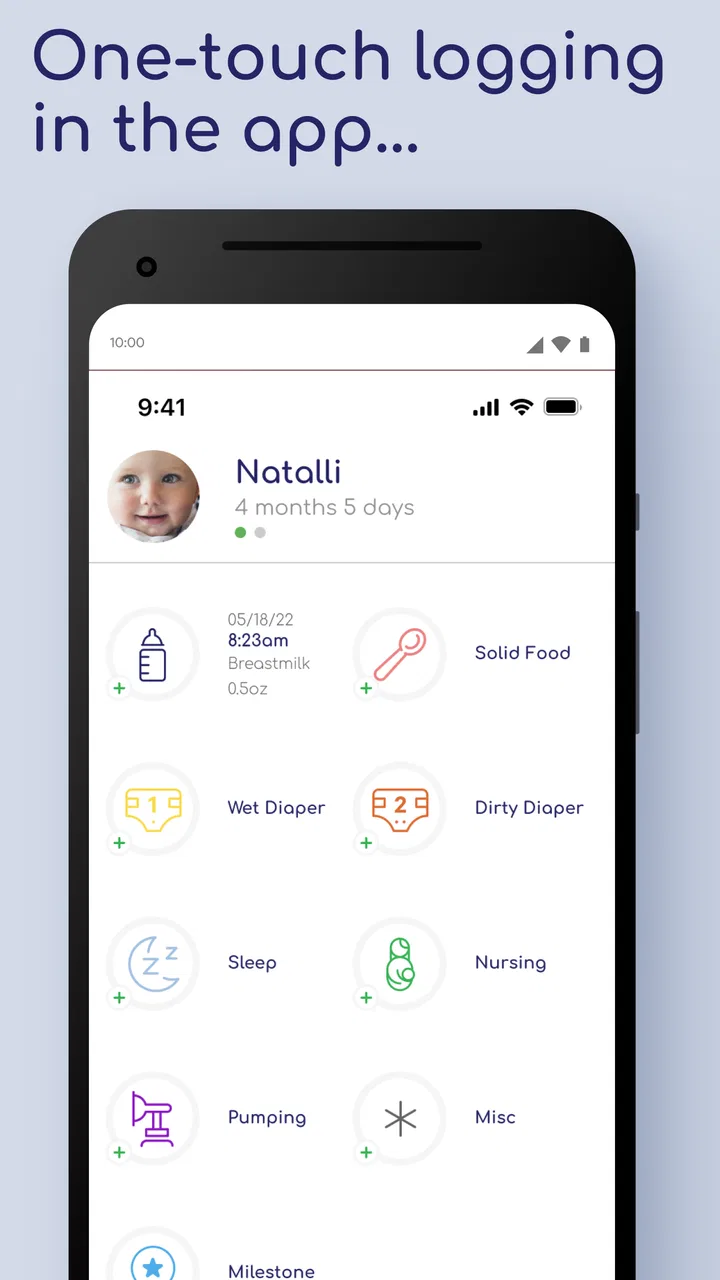
When a baby arrives, even simple questions can become surprisingly difficult: When was the last feeding? How long did the nap last? Which diaper was the most recent one? Talli Baby is designed for that tired, practical moment. It is a medical-category tracking app from Talli, Inc. that brings infant feeding, sleep, and diaper notes into one place. I found its value less in analysis and more in reducing the mental load of remembering small events throughout a busy day.
The app is free to install and is rated for Everyone, which makes it approachable for parents, relatives, and caregivers who want a straightforward record rather than a complicated parenting system. Its average rating is 4.2 from around 1.1 thousand ratings, and it has passed 10 thousand installs. Those figures suggest a modest but established user base, not an app that feels entirely experimental.
My overall impression is that Talli Baby works best as a shared memory aid. It does not replace medical advice, and I would not use any log as a reason to ignore a pediatrician’s instructions. What it can do is give you a consistent place to record routine care, notice patterns, and answer practical questions when sleep deprivation makes ordinary recall unreliable.
You May Also Like

 AccuWeather: Weather Radar
AccuWeather Review: A Quick, Clear Forecast for Everyday Decisions
For everyday plans, the best forecast is the one you can understand quickly. AccuWeather makes rain timing, radar, and local conditions easy to act on, with a few trade-offs.

 Hill Climb Racing
Why Hill Climb Racing Still Turns Crashes Into One More Run
A tiny car, a bumpy hill and one more upgrade: Hill Climb Racing keeps resurfacing because its simple chaos makes every near-miss feel personal.

 AliExpress - Shopping App
AliExpress Makes Global Shopping Feel Personal, but Shoppers Bear the Risk
AliExpress turns a global marketplace into a pocket-sized discovery engine. Its reach is useful, its shopping loop compelling, and its trade-offs easy to miss.

 Lords Mobile: Kingdom Wars
Lords Mobile Is a Kingdom-Building Routine, Not a Quick Match
A case-by-case verdict on the building, battles, device demands, and social commitments that make Lords Mobile rewarding for some players and exhausting for others.

 PDF Scanner app - TapScanner
TapScanner Makes Paperwork Easier to Capture, Check, and Share
TapScanner makes scanning with a phone feel less like a rescue operation and more like a dependable step in getting work done. Its capture tools are useful, though not flawless.

 Block Blast!
 Shows How Much a Puzzle Game Can Leave Out
A quiet grid game shows why puzzle players increasingly value instant clarity, repeatable skill and low-pressure play—and where the genre still needs to catch up.
More From Our News Desk
View All News


What to expect when you open Talli Baby
The most useful way to think about this app is as a quick event journal for the first months and years of care. Instead of keeping separate notes for bottles, naps, and diapers, you can keep those observations together. That matters when a baby’s day does not follow a neat schedule and several adults are taking turns providing care.
A first-time user should expect to spend a little time learning the rhythm of recording rather than receiving an elaborate guided parenting program. The store summary focuses on infant feeding, sleep, and diaper logging, and that focus is important. Talli Baby is strongest when you use it for timely entries, not when you expect it to diagnose a problem or create a complete health record.
I also appreciate the difference between recording an event and trying to interpret it. A log can show that feeding has become more frequent or that naps are changing, but it cannot explain why. That distinction is especially important with infants, whose routines can shift quickly. The app can help you bring clearer observations to a healthcare conversation, while the healthcare professional remains responsible for interpretation.
Because the app covers three connected parts of daily care, it can be more useful than a single-purpose timer. A feeding entry may make more sense beside a later sleep entry, and a diaper record can help you remember the overall flow of a day. The benefit comes from seeing the routine as a sequence rather than as isolated reminders.
There is also a trade-off. A combined log is only helpful if you actually keep it current. If you enter several events from memory at the end of the day, the record may be less reliable than a quick note made immediately after care. I recommend treating each entry as a tiny handoff to your future self: record it while the detail is still fresh, then move on.
Who will get the most from it
I would recommend Talli Baby to new parents who are sharing care, anyone who feels that tiredness is making routine details blur together, and families who want a simple history to discuss with a clinician. It is also a sensible option for a grandparent, partner, or babysitter who needs to understand what has already happened during a shift.
It may be less suitable for someone who wants a broad family organizer, extensive developmental tracking, or a highly customized medical record. The app’s appeal is its narrow focus. If your main goal is managing appointments, shopping, vaccinations, or a whole household calendar, you may prefer a broader parenting platform and use this kind of tracker only for infant care.
Setting up a useful routine instead of just installing the app
The first setup should be approached as a habit decision, not merely a technical one. Before recording anything, decide who will use the log and when. If two caregivers are involved, agree that both will record their own events as soon as possible. A shared routine is more valuable than a perfectly organized first day followed by a week of missing notes.
I would begin with the simplest possible goal: capture the next feeding, sleep period, and diaper change. Do not try to reconstruct the baby’s entire history immediately. Starting with the next real event makes the app feel manageable and gives you a meaningful result quickly.
It is also worth deciding what level of detail is genuinely sustainable. Parents often want to document everything during the first enthusiastic setup, then discover that excessive note-taking becomes another source of stress. Use the fields the app presents consistently, but avoid turning every entry into a long explanation unless there is a specific reason to do so.
The current version is 1.4.1, and the listed minimum operating system is version 7.0. That makes the app accessible on many older compatible devices, which is useful if a caregiver keeps an older phone at home. I would still check that every person who needs to participate can access the app comfortably before relying on it as the household’s main record.
There is a financial detail worth noticing before you commit to a long-term workflow. The app is free, but it includes optional in-app purchases ranging from $3.99 to $39.99 per item. I would start with the free experience and decide whether the routine genuinely helps before paying for anything. A paid option is easier to judge when you already know which part of the app you use most.
A practical first-day setup
On the first day, I would keep the phone somewhere that is easy to reach during feeding or after a diaper change, while still avoiding any unsafe distraction during care. The best location is usually the place where the caregiver naturally pauses afterward, not a room across the house.
Next, make one entry immediately after the next routine event. This tests whether the recording flow feels quick enough for your real life. If you need several taps and interruptions every time, you may postpone entries and lose accuracy. If the process feels light, it is more likely to become automatic.
Finally, show the workflow to anyone else who will use it. Do not assume that another caregiver will interpret an unfinished entry the same way you do. A thirty-second explanation can prevent duplicated records, especially when people are switching shifts and both think the other person has already logged the event.
One non-obvious advantage of this approach is that it exposes the app’s real usefulness before you invest emotional energy in organizing old information. You are testing the complete loop: notice the event, record it, and later understand what the record means. That loop matters more than having a beautifully filled-in first screen.
Getting to the first meaningful success
Your first success should not be a perfect daily chart. It should be answering one ordinary question without guessing. For example, after a difficult night, you might want to know when the last sleep period ended or whether a feeding was already recorded. If Talli Baby lets you answer that quickly, it has already earned a place in your routine.
Try this workflow: after the next feeding, record it while the memory is fresh. When the baby later sleeps, record that event separately. Then add the next diaper change. At that point, you have created a small timeline rather than three disconnected reminders. The exercise is simple, but it teaches you how the app becomes useful over the course of a day.
A realistic scenario is a handoff between caregivers in the early morning. One person is exhausted and needs to sleep; the other wants to know what happened overnight. Instead of relying on a whispered summary that may be forgotten, the incoming caregiver can review the recent log and ask focused questions. The app does not remove the need to communicate, but it gives the conversation a more dependable starting point.
Another useful scenario involves a pediatric appointment. Rather than trying to remember a week of irregular feeding or sleep, you can review your entries beforehand and identify the periods that seem worth mentioning. I would not present the log as a diagnosis, but it can help you describe timing more clearly and avoid overstating or understating what happened.
For families with more than one caregiver, consistency is more important than speed alone. Agree on a simple rule: the person who completes the care records it, unless the other person is already handling the handoff. This prevents two common problems—duplicate entries and the assumption that someone else will remember later.
Three habits that make the log more reliable
- Record close to the event. A quick entry after care is usually more dependable than rebuilding a full day from memory.
- Use the same routine during handoffs. One caregiver can check the recent record before taking over, while the departing caregiver mentions anything unusual verbally.
- Review patterns at a calm time. Looking back during a quiet moment is more useful than trying to interpret every entry while the baby is crying.
The third habit is particularly important. Tracking can become stressful when every variation looks meaningful. I found it more helpful to use the record for broad context: a disrupted night, a cluster of feedings, or a change that continues over several entries. A single unusual event deserves attention when necessary, but it should not automatically become a conclusion.
Parents sometimes ask whether an app like this is worthwhile if they already use paper notes. My answer is that the choice depends on the handoff problem. Paper can be faster for one person at home, but a digital log may be easier to consult when several caregivers are involved. If paper already gives your household a clear, shared record, switching is not automatically an improvement.
Common confusion and the friction to expect
The biggest source of confusion is likely to be the difference between a care log and a medical tool. Talli Baby belongs in the first group. It can organize observations about feeding, sleep, and diapers, but it should not be treated as a source of medical guidance. If your baby seems unwell or you are worried about intake, hydration, breathing, fever, or behavior, contact an appropriate healthcare professional rather than waiting for a pattern to emerge in the app.
Another point of friction is incomplete logging. A record with occasional gaps can still help, but it should not be mistaken for a complete account. If one caregiver records every feeding and another records only diapers, the resulting picture may look more precise than it really is. I would rather see a family agree on a modest, consistent routine than attempt to document everything and abandon it.
There is also the question of privacy and phone access. Infant-care notes can be personal, and a device may be used by several people. Before making the app central to your routine, consider who can physically access the phone and whether that arrangement feels comfortable. I would avoid entering information that is unnecessary for the care log, especially if it could create confusion later.
Some users may also expect automatic recommendations because the app sits in the medical category. That expectation would be misplaced. The practical strength here is recording, not replacing professional judgment. I see that limitation as healthy, but it means the app will feel underpowered to anyone searching for personalized schedules or clinical explanations.
The optional purchase structure may create another decision point. Since the app is free but offers items from $3.99 to $39.99, take time to understand whether a paid feature solves a problem you actually have. Do not buy simply because you feel that a serious parent should use every available option. The right test is whether the additional capability saves effort or improves the specific workflow you already use.
Compared with a paper notebook, Talli Baby offers a more purpose-built way to keep feeding, sleep, and diaper information together, while paper remains appealing for speed, flexibility, and independence from an app. Compared with a broad parenting suite, this app’s narrower scope may feel calmer and easier to maintain, but it may not cover the rest of your family’s planning needs. Compared with a basic notes app, its dedicated focus should make the record easier to understand later, provided you use it consistently.
Those comparisons point to a clear trade-off: Talli Baby is not trying to be everything. That is good for a first-time user who wants to begin with three daily care areas, but it is less convincing for someone who wants one master dashboard for every child-related task.
What to do after the first week
After several days, review how you actually used the app rather than how you intended to use it. Did you record events immediately, or did you enter them in batches? Did another caregiver participate? Were you checking the history during handoffs, or only adding information? These answers tell you whether the app fits your household’s behavior.
If the log is helping, keep the workflow small. Continue recording the events that answer real questions and avoid adding detail merely to make the history look complete. A sustainable record is more valuable than an ambitious one that becomes a burden.
If the app is not helping, identify the exact reason before abandoning digital tracking altogether. Perhaps the phone is not nearby, perhaps another caregiver needs a clearer handoff, or perhaps you need a broader tool. In the first case, changing where you keep the phone may solve the problem. In the second, agreeing on responsibility may be enough. In the third, a wider family organizer may be a better choice.
I would also use the first week to establish a review habit. Choose a calm time to look over recent entries and note questions for a clinician if needed. This turns the app from a passive list into a practical preparation tool, without asking it to interpret health information beyond its role.
Talli Baby is a good fit when your main challenge is remembering the everyday sequence of infant care. It is free to begin, accessible on older compatible operating systems, and focused enough that a tired caregiver can understand its purpose quickly. The rating of 4.2 from around 1.1 thousand ratings reflects a generally positive reception, though I would still judge it by your own routine rather than by popularity alone.
My recommendation is to try it with one clear objective: make the next caregiver handoff easier. If it helps you answer what happened recently without searching through scraps of paper or relying on tired memory, keep using it. If you need medical guidance, extensive family planning, or a highly detailed health record, choose a tool designed for that job instead. For straightforward infant feeding, sleep, and diaper tracking, Talli Baby offers a sensible starting point—as long as you treat it as a record-keeping aid, not a substitute for care.
FAQs for Talli Baby
01What is Talli Baby, and what can parents use it for?
Talli Baby is designed to help parents organize and monitor everyday baby-care information in one place. Depending on the version and connected features available, it may support tracking activities such as feeding, sleep, diaper changes, pumping, medication, growth, or other routines. It can be useful for identifying patterns and sharing updates with caregivers, although it should complement—not replace—professional medical advice.
02Is Talli Baby suitable for newborns and babies of all ages?
The app can be helpful during the newborn stage and later as routines change, but the most appropriate features may depend on your child’s age and your family’s needs. Before downloading, check the current store description for supported age ranges, device compatibility, and any requirements for connected Talli hardware. Parents should also confirm with a pediatrician how tracked information should be interpreted.
03Does Talli Baby require a Talli device or other accessories?
Some Talli Baby functions may work as a standalone tracking app, while other features can depend on compatible Talli hardware or accessories. This distinction is important because purchasing or using the app alone may not provide access to every monitoring or automation feature. Review the official product listing carefully to see which functions are included, which require equipment, and whether additional setup is necessary.
04Can multiple parents or caregivers access the same Talli Baby information?
Shared access can be especially useful when parents, relatives, babysitters, or healthcare professionals help with daily care. Talli Baby may offer ways to synchronize or share a child’s records, but the exact options can vary by account type, app version, and device configuration. Before relying on it, check how invitations, permissions, data synchronization, and account recovery work for every caregiver who needs access.
05Is the information stored in Talli Baby private and secure?
Because baby-tracking records can include personal, health-related, and household information, privacy should be considered before creating an account. Read the app’s current privacy policy to understand what data is collected, why it is used, whether information is synchronized online, and how it may be shared. Use a strong password, keep the app updated, and avoid treating the app as an emergency medical monitoring system.
Pros
- Tracks feeding
- sleep
- diapers
- pumping
- and growth in one place.
- Simple logging makes daily baby-care routines easier to monitor.
- Useful summaries can help identify changes in your baby’s habits.
- Supports shared caregiving when multiple family members track updates.
- Helpful reminders may reduce the chance of forgetting routine tasks.
Cons
- Manual data entry can become time-consuming during busy days.
- Some advanced tools or insights may require a paid subscription.
- The app should not replace professional medical advice or diagnosis.
- Notifications may feel excessive if too many reminders are enabled.
- Data accuracy depends on every caregiver recording activities consistently.

Talli Baby
Gallery